FRAME NOTES
A Figma plugin that lets designers attach persistent notes to individual frames.
Overview
The Problem
The Solution
Real Use Cases
Brainstorming
While working on design projects, I've often found myself revisiting old design files and asking, "Why did I make this decision?".
I would have to dig down the rabbit hole of comments, Slack messages, and documentation. Design rationale became fragmented, making it difficult for teammates—or even my future self—to understand why a screen was designed a certain way.
I built Frame Notes to bring context directly into the design file.
Role: Solo designer & builder
Tools: Figma Plugin API, HTML/CSS/JS
Status: In review by Figma
Timeline: 1 day
Every screen goes through discussions, feedback, trade-offs, and iterations, yet the reasoning behind those decisions often lives outside the design file.
Weeks later, revisiting a design becomes difficult. Designers spend time retracing old conversations, developers lack implementation context, and new teammates struggle to understand why a particular solution was chosen.
Frame Notes allows designers to attach lightweight notes to individual frames.
Each note stays associated with its frame, creating a simple layer of documentation inside the design workflow.
The designer opens Frame Notes to document its origin.
AI tool used
Prompt used
The designer opens Frame Notes to understand a screen.
Who created it
Prompt
Design rationale
The designer opens Frame Notes, writes handoff notes
Specifications
Design rationale
The designer opens Frame Notes, writes custom notes
Research Link
Design rationale


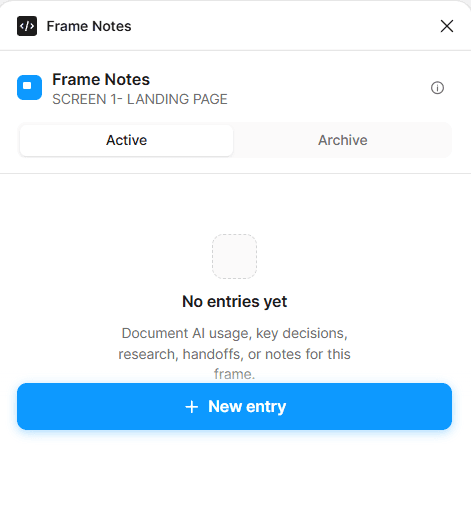
How it works?
Select a frame, run the plugin, add a New Entry!
User has Five options, each intentionally narrow:
AI usage — which AI tool, and the prompt used
Key decision — a title and the reasoning behind it
Research note — an optional source link plus a takeaway
Handoff note — context for whoever picks this up next
Custom note — the escape hatch for everything else
Every entry is timestamped and attributed automatically with users name.
Entries can be Archived instead of deleted, so the active list stays useful without losing history.
A hard cap of 10 active entries per frame was a deliberate constraint — more than that, and a frame stops being a frame and starts being a wiki page.
Story Time
The initial idea was to capture all changes made to a frame, from the onset of plugin - created by, edited by, approved by and more.
Constraint discovered: Plugin could not auto run once selected, it needs to be selected every time user wants to run it, creating user friction.



What I shipped?
Outcome
What I'd build next

Instead of only seeing that a frame changed, I would explore save meaningful frame snapshots- to retrieve back exact frame, compare before vs after.
Add status Tags- draft frame, approved, rejected, Developer Handoff and more.
Slider that shows what percentage of frame is AI Built and human built.


Story Time
The initial idea was to capture all changes made to a frame, from the onset of plugin - created by, edited by, approved by and more.
Constraint discovered: Plugin could not auto run once selected, it needs to be selected every time user wants to run it, creating user friction.
Story Time
Constraint discovered: Plugin could not auto run once selected, it needs to be selected every time user wants to run it, creating user friction.
The initial idea was to capture all changes made to a frame, from the onset of plugin - created by, edited by, approved by and more.
User has Five options, each intentionally narrow:
AI usage — which AI tool, and the prompt used
Key decision — a title and the reasoning behind it
Research note — an optional source link plus a takeaway
Handoff note — context for whoever picks this up next
Custom note — the escape hatch for everything else
Every entry is timestamped and attributed automatically with users name.
Entries can be Archived instead of deleted, so the active list stays useful without losing history.
A hard cap of 10 active entries per frame was a deliberate constraint — more than that, and a frame stops being a frame and starts being a wiki page.
How it works?
Select a frame, run the plugin, add a New Entry!
What I shipped?
Outcome
What I'd build next?
Instead of only seeing that a frame changed, I would explore save meaningful frame snapshots- to retrieve back exact frame, compare before vs after.
Add status Tags- draft frame, approved, rejected, Developer Handoff and more.
Slider that shows what percentage of frame is AI Built and human built.
FRAME NOTES
A Figma plugin that lets designers attach persistent notes to individual frames.
Overview
The Problem
The Solution
Real Use Cases
While working on design projects, I've often found myself revisiting old design files and asking, "Why did I make this decision?".
I would have to dig down the rabbit hole of comments, Slack messages, and documentation. Design rationale became fragmented, making it difficult for teammates—or even my future self—to understand why a screen was designed a certain way.
I built Frame Notes to bring context directly into the design file.
Role: Solo designer & builder
Tools: Figma Plugin API, HTML/CSS/JS
Status: In review by Figma
Timeline: 1 day
The designer opens Frame Notes to document its origin.
AI tool used
Prompt used
The designer opens Frame Notes to understand a screen.
Who created it
Prompt
Design rationale
Every screen goes through discussions, feedback, trade-offs, and iterations, yet the reasoning behind those decisions often lives outside the design file.
Weeks later, revisiting a design becomes difficult. Designers spend time retracing old conversations, developers lack implementation context, and new teammates struggle to understand why a particular solution was chosen.
Frame Notes allows designers to attach lightweight notes to individual frames.
Each note stays associated with its frame, creating a simple layer of documentation inside the design workflow.
The designer opens Frame Notes, writes handoff notes
Specifications
Design rationale
The designer opens Frame Notes, writes custom notes
Research Link
Design rationale
How it works?
Select a frame, run the plugin, add a New Entry!
Story Time
The initial idea was to capture all changes made to a frame, from the onset of plugin - created by, edited by, approved by and more.
Constraint discovered: Plugin could not auto run once selected, it needs to be selected every time user wants to run it, creating user friction.
Brainstorming


